The launch of Android native desktop mode marks a significant step forward for Google’s mobile operating system. With the March Pixel Drop update, Google has officially introduced a built-in desktop experience for Pixel devices, bringing a long-awaited feature to Android users. This development allows compatible smartphones to function more like personal computers when connected to an external display.
For years, Android enthusiasts have hoped for an official desktop interface similar to Samsung’s DeX. Now, with Android native desktop mode becoming part of the core Android experience, Google is finally delivering a more versatile and productive mobile platform.
What Is Android Native Desktop Mode?
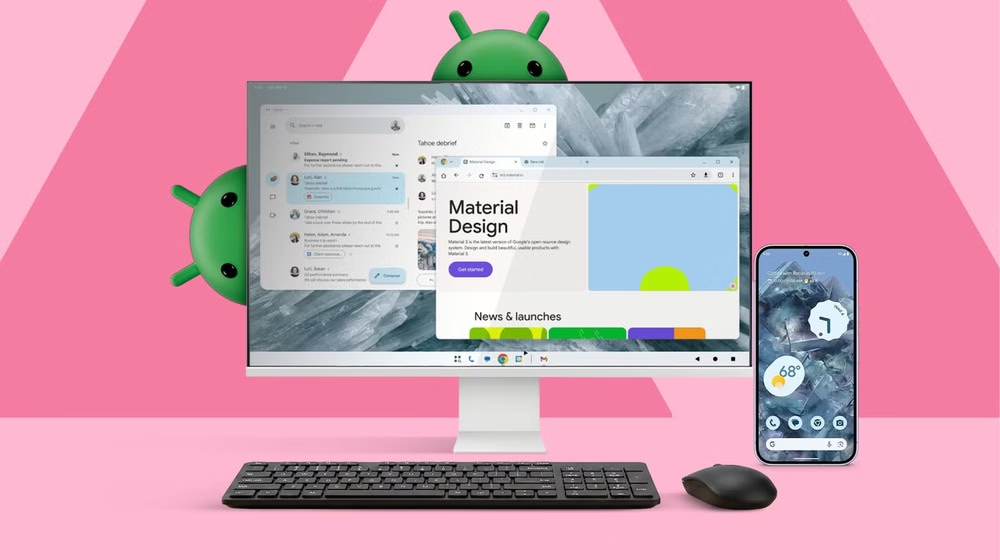
The new Android native desktop mode transforms a smartphone into a desktop-like environment when connected to a monitor. Users can plug their device into an external screen via USB-C and use a keyboard and mouse for navigation.
Once connected, the phone displays a desktop-style interface that supports multitasking, windowed applications, and larger-screen productivity tools. This allows users to run multiple apps at once, resize windows, and interact with Android apps in a more traditional computing format.
The feature brings Android closer to the concept of a mobile-powered computer, where a single device can handle both smartphone and desktop tasks.
Currently Available on Pixel Devices
At the moment, Android native desktop mode is available only on newer Pixel models. Devices starting with the Google Pixel 8 and later versions support the feature.
To activate the desktop experience, users need a monitor with USB-C connectivity. After connecting the device to the monitor, they can pair a keyboard and mouse via Bluetooth or USB for easier navigation.
This setup allows the Pixel phone to function similarly to a lightweight computer, making tasks such as document editing, browsing, and media management more comfortable on a larger screen.
Development and Evolution
The journey toward Android native desktop mode has been underway for some time. Early versions of the feature appeared unofficially in preview builds of Android 16 during its QPR development phase.
Initially, the desktop interface had several usability issues, including limited window management and inconsistent multitasking behavior. However, Google continued refining the system to create a smoother and more intuitive experience.
The goal was to develop a solution comparable to Samsung’s DeX, which has long allowed Samsung devices to operate as desktop workstations when connected to monitors.
With the official release in the March Pixel Drop update, Google has taken a major step toward making desktop functionality a standard feature in Android.
Multitasking and Window Management
One of the most notable features of Android native desktop mode is its improved multitasking capabilities. Instead of switching between full-screen apps, users can open several applications in resizable windows.
This makes it easier to work on multiple tasks simultaneously. For example, users could edit documents while keeping a browser window open for research or manage messages while watching a video.
In addition, windowing support has been expanded for the Pixel Tablet. Tablet users can now resize and organize apps directly on the screen, offering a more flexible and productive user interface.
Integration With Google AI Tools
The March Pixel Drop update also introduces several artificial intelligence improvements alongside Android native desktop mode. One of the key enhancements involves the growing integration of Google Gemini.
In its current beta stage, Gemini can help users perform everyday tasks such as ordering food, booking transportation, or creating shopping lists. These AI-powered features aim to make smartphones more helpful and proactive in daily life.
Although availability may vary by device and region, the expansion of AI tools reflects Google’s broader strategy of embedding intelligent assistance throughout the Android ecosystem.
Additional Features in the Update
Beyond the introduction of Android native desktop mode, the March Pixel Drop includes several other improvements designed to enhance user experience.
A new comfort display filter uses AI to soften screen brightness and reduce eye strain during extended use. Meanwhile, the Circle to Search feature has been upgraded to recognize clothing items and allow users to virtually try on outfits.
The update also improves the Now Playing feature, helping users track music they have recently listened to. Additionally, the At a Glance widget now displays useful information such as sports scores directly on the lock screen.
Custom icon options have also been introduced, giving Pixel users more ways to personalize their device interface.
The Future of Android Desktop Experiences
The release of Android native desktop mode could influence the future direction of Android devices. Since the feature has now become part of the core Android framework, it is possible that other manufacturers will adopt it in their upcoming smartphones.
If widely implemented, this capability could blur the line between smartphones and traditional computers. Instead of carrying multiple devices, users could rely on a single smartphone to handle both mobile and desktop tasks.
For professionals, students, and everyday users, this could mean greater flexibility and productivity without needing a separate laptop.
The introduction of Android native desktop mode represents a significant milestone in the evolution of Android. By bringing a true desktop-style interface to Pixel devices, Google has taken an important step toward expanding the capabilities of smartphones.
As the feature continues to develop and possibly expand to more devices, it may redefine how users interact with their phones. With improved multitasking, AI integration, and larger-screen productivity, Android’s desktop future is finally starting to take shape.